![App Manager v4.1.0 [Stable]](https://images.mobilism.org/?dm=GVVT "App Manager v4.1.0 [Stable]")
Follow Us!

App Manager v4.1.0 [Stable]
Requirements: 5.0 and up
Overview: A full-featured open source package manager for android. App Manager began by merging the features of App_packages Info (formerly Application Info), ClassyShark3xodus, Activity Launcher and Watt into a single app with material design and dark mode to give a modern look and feel.
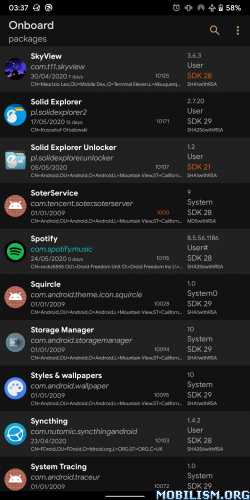
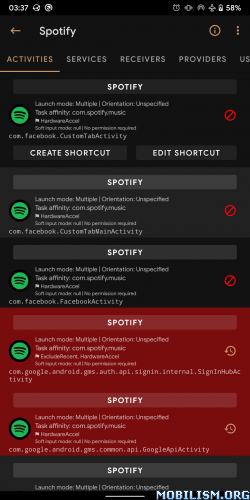
App Manager began by merging the features of App_packages Info (formerly Application Info), ClassyShark3xodus,
Activity Launcher and Watt into a single app with material design and dark mode to give a modern look and feel.
Features
General features
● Fully reproducible, copylefted libre software (GPLv3+)
● Material design (but not material colours!)
● No unnecessary permissions
● Does not connect to the Internet
● Displays as much info as possible in the main page
● Lists activities, broadcast receivers, services, providers, permissions, signatures, shared libraries, etc. of any app
● Launch (exportable) activities and services
● Create (customizable) shortcuts of activities
● Intercept activities
● Scan for trackers and libraries in apps and list (all or only) tracking classes (and their code dump)
● View the manifest of an app
● Display your app usage, data usage, and app storage info (requires “Usage Access” permission)
● Install/uninstall APK files (including APKS, APKM and XAPK with OBB files)
● Share APK files
● Back up/restore APK files
● Batch operations
● One-click operations
● Logcat viewer
● Profiles (including presets for quick debloating)
● View app usage along with mobile and wifi data usage
● Open app in Aurora Store or in your F-Droid client
● Sign APK files before installing them
● Backup encryption: OpenPGP via OpenKeychain, RSA (hybrid encryption with AES) and AES.
Root/ADB-only features
● Revoke permissions considered dangerous by Android
● Deny or ignore app ops
● Display/kill/force-stop running processes/apps
● Clear app data or app cache
Root-only features
● Block any activities, broadcast receivers, services, or providers of an app with native import/export as well as Watt and Blocker import support
● View/edit/delete shared preferences of any app
● Back up/restore apps with data, rules and extras (such as permissions, battery optimization, SSAID, etc.)
● System configuration, blacklisted or whitelisted apps
● View/change SSAID, net policy, battery optimization
…and many more! This single app combines the features of 5 or 6 apps any tech-savvy person needs!
What’s New:
App Manager v4.1.0
App Manager v4.1.0 comes with massive performance boosts, newly added ADB backup support, UI enhancements, and various other improvements. Visit Settings > About > Version/Changelog for details.
ADB data backup
App Manager now offers full support for ADB backups. A new “ADB data” backup option has been added which supersedes standard internal/external data backups. It creates package-specific .ab files safely encrypted by App Manager without requiring manual ADB backup passwords. Additionally, KeyStore backups are now made optional for Android 12 onwards since KeyStore can no longer be backed up.
Password prompt
When ADB backup is triggered by App Manager, the Android system may ask you to enter a password. You must leave the password field empty and click “OK” to proceed.
Introducing filter-based profiles
A filter-based profile makes it easy to apply the configurations to the dynamically filtered applications at the time of running the profile. Besides the default “and” based filtering, custom expressions can also be used.
Custom expressions
For each profile, each filter item has an unique ID which can be used to refer the filter items in the custom expression field in the “Filters” dialog. Supported operators are & (and), | (or), and parenthesis.
Barchart in App Usage
The App Usage page now displays a visual bar chart for screen time directly in the details dialog. Next and previous buttons have been added to easily browse usage statistics across different days and weeks. Time interval handling has also been simplified by replacing “Today” with “Daily” and removing “Yesterday”.
Known limitation: App Manager retrieves usage history from the system. Therefore, the length of the usage history varies across devices and is much less than a typical digital wellbeing application which maintains its own database.
Expanded installer options
Users now have greater control over per-session installer options. Added support for configuring system-level options such as “Request update ownership”, “Default package source”, and “Set package origin/URI”. In addition, there is a new option to temporarily disable APK verification during installation.
Massive performance improvements
The performance of the tracker and library scanner has been significantly improved. By adopting the native (C++) implementation of the Aho-Corasick algorithm, library scanning now yields up to 1000x speedups via parallel processing. Furthermore, a 200 ms debouncer has been introduced for realtime searching and filtering, greatly improving overall performance and reducing power consumption. On the main page, most of the filter implementations have been replaced with Finder-based filters. This change brings semi-realtime updates instead of relying heavily on the cache (especially for force-stop and freeze operations).
UI and Accessibility improvements
The app has adopted Material 3 (M3) style preferences across the board. Accessibility has been vastly improved in various places, including the Running Apps page, Log Viewer, File Manager, Debloater, multi-selection panels, and general Action content descriptions. Support has also been added to change the app language directly from Android Settings in Android 13 onwards.
Others
– Fixed a low severity privilege escalation vulnerability in ADB mode (thanks to 签到型CTFer et al).
– Added option to view, generate, and verify file checksums from file properties in the File Manager.
– Allow managing certain permissions (such as battery optimization and network policy) directly in no-root mode by redirecting to the native system settings.
– Added “Frozen apps” and “Unfrozen apps” filters in the Main and Debloater pages.
– Added dual pane support for “Language” and “About the device” in the Settings page.
– Display “running” tag for apps running without any active services.
Full Changelog: v4.0.5…v4.1.0
This app has no advertisements
More Info:https://github.com/MuntashirAkon/AppManager
Download Instructions:
https://ouo.io/79DNAc
Mirror:
https://ouo.io/EVTexf
https://ouo.io/B1sWT1I