![Solid Explorer File Manager v3.5.12 [Full] [Mod Extra]](http://images.mobilism.org/?dm=EO32 "Solid Explorer File Manager v3.5.12 [Full] [Mod Extra]")
Follow Us!

Solid Explorer File Manager v3.5.12 [Full] [Mod Extra]
Requirements: 6.0+
Overview: Solid Explorer is a file management app inspired by the old school file commander applications.
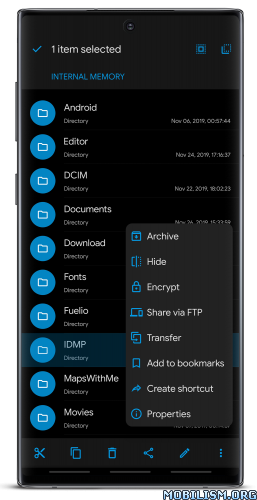
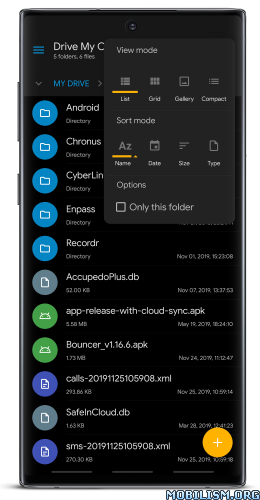
Solid Explorer is a powerful file manager that gives you full control over files on your device, in the cloud, and across your network.
Dual-pane layout — drag and drop files between two panels
AES-256 encryption — lock files with password or fingerprint
Cloud & network access — Google Drive, OneDrive, Dropbox, SMB, SFTP, FTP & more
Web file sharing — send files to any device with a web browser
Manage files your way
Navigate two folders side by side and drag files between panels — the fastest way to organize storage. Use indexed search to find anything instantly, batch rename files with patterns, and browse collections that automatically sort your Downloads, Photos, Videos, Music, Documents, and Apps.
Access all your storage in one app
Connect to Google Drive, OneDrive, Dropbox, Box, Mega*, MediaFire, Yandex, Owncloud and SugarSync. Access NAS drives and servers over SMB/CIFS (Samba), SFTP, FTP, and WebDAV. Transfer files between any two locations — cloud to cloud, server to phone, or SD card to NAS — just drag between panels.
Share files with any device
Start the built-in web server and share files with any phone, tablet, or computer on your network — the other device just needs a web browser. No app install needed on the receiving end.
Keep your files private
Encrypt sensitive files with AES-256 and lock them behind a password or fingerprint. Encrypted files stay protected even if you uninstall the app — no account required.
Clean up and free storage
Analyze what takes up space, find duplicate and large files, and clean up junk — similar to dedicated cleaner apps, but built right into your file manager. Works across internal storage, SD cards, USB OTG drives, and even cloud storage like Google Drive, OneDrive, and Dropbox.
Full feature list:
• Dual-pane layout — manage two folders side by side
• Cloud storage — Google Drive, OneDrive, Dropbox, Box, NextCloud, SugarSync, MediaFire, Yandex, Mega*
• Network protocols — FTP, SFTP, SMB/CIFS (Samba), WebDAV
• Web file sharing — share files with any device via browser
• Storage analyzer — find duplicates, large files, and junk to clean up
• File encryption — AES-256 with password and fingerprint
• Archives — create and extract ZIP, 7ZIP, RAR, TAR
• Root explorer — browse system files on rooted devices
• Indexed search — find files instantly with filters
• Collections — Downloads, Recent, Photos, Videos, Music, Documents, Apps
• Built-in media — image viewer, music player, video player, text editor
• Batch rename — rename multiple files with patterns
• FTP Server — access your phone’s files from PC
• Themes and icon sets — rich customization
• Chromebook & tablet support — mouse, keyboard and trackpad input
Follow us on Reddit: https://www.reddit.com/r/NeatBytes/
* with paid add-on
What’s New:
v3.5.12
New system of resumable file operations – great increase in file transfer reliability
using system share menu
display high-res images in the image viewer
Chromecast integration in the video player
improved text editor performance
fixed WebFS file operations
fixed external storage detection
WebP animated thumbnails
fixed secure cloud backup
fixed Box login
Mod Info:
- Full / Paid features unlocked – no additional key required;
- Disabled / Removed unwanted Permissions + Receivers + Providers + Services;
- Optimized and zipaligned graphics and cleaned resources for fast load;
- Ads Permissions / Services / Providers removed from AndroidManifest;
- Ads links removed and invokes methods nullified;
- Ads layouts visibility disabled;
- Google Drive Cloud doesn’t work;
- Google Play Store install package check disabled;
- Debug code removed;
- Startup disabled;
- Remove default .source tags name of the corresponding java files;
- Analytics / Crashlytics / Firebase disabled;
- Work with original plugins;
- No active trackers or advertisements;
- Languages: Full Multi Languages;
- CPUs: armeabi-v7a, arm64-v8a, x86, x86_64;
- Screen DPIs: 160dpi, 240dpi, 320dpi, 480dpi, 640dpi;
- Original package signature changed;
- Release by Balatan.
This app has no advertisements
More Info:https://play.google.com/store/apps/details?id=pl.solidexplorer2
Download Instructions:
All-in-One Universal Mod:
https://ouo.io/l885JP
Mirrors:
https://ouo.io/IFmPCeL
https://ouo.io/V9MAjj
https://ouo.io/WewaPlo
https://ouo.io/YPCGeCg
https://ouo.io/TX1JrJw
arm64-v8a:
https://ouo.io/7aaKT3
Mirrors:
https://ouo.io/eU30Xc
https://ouo.io/1CHMtf
https://ouo.io/piPBVtb
https://ouo.io/Q2qsts
https://ouo.io/aK1sTG
armeabi-v7a:
https://ouo.io/0nJUng
Mirrors:
https://ouo.io/YtDzd7
https://ouo.io/ZL49nK
https://ouo.io/yypRfLI
https://ouo.io/tkxPdQ
https://ouo.io/Oum4D2B
Mirrors:
https://ouo.io/nYB1aWy
https://ouo.io/e9wyTG
https://ouo.io/Ct46R8G
https://ouo.io/xhfRY5
https://ouo.io/CdlMzK
x86_x64:
https://ouo.io/Bmy2kx
Mirrors:
https://ouo.io/kKsdFr3
https://ouo.io/xU8ovzC
https://ouo.io/8KkWp2
https://ouo.io/CUARh6Z
https://ouo.io/BEF5kn
Plugins for Solid Explorer: USB OTG Plugin v1.0.6 | FTP Server v1.2.5 | MEGA v1.1.8 [armeabi-v7a] [arm64-v8a] [x86] [x86-x64] | Cast v1.0 | Amazon Cloud Drive & S3 v1.0.2
https://ouo.io/Bf6Zh7
Mirrors:
https://ouo.io/4hZvxDg
https://ouo.io/Iz96RP
https://ouo.io/R1zek1
https://ouo.io/PHT2bD[/vuhqwhuedotm
https://ouo.io/pRPB79X
https://ouo.io/sC7e4A
Icons Pack for Solid Explorer: Unfolded Icons v1.1 | Paper Icons v1.1 | Shadow Icons v1.1
https://ouo.io/3EnK53
Mirrors:
https://ouo.io/3d8U3r
https://ouo.io/Cy5c25