NetX Network Tools PRO v11.0.0.0 [Paid] [Bundle + AntiSplit]
![NetX Network Tools PRO v11.0.0.0 [Paid] [Bundle + AntiSplit]](data:image/svg+xml,%3Csvg%20xmlns='http://www.w3.org/2000/svg'%20viewBox='0%200%20281%20500'%3E%3C/svg%3E "NetX Network Tools PRO v11.0.0.0 [Paid] [Bundle + AntiSplit]")
Requirements: 7.0+
Overview: Network Scanner & Analyzer – All-in-One Network Toolkit. Scan and analyze your network in real time, identifying all connected devices. Get detailed information for each device.
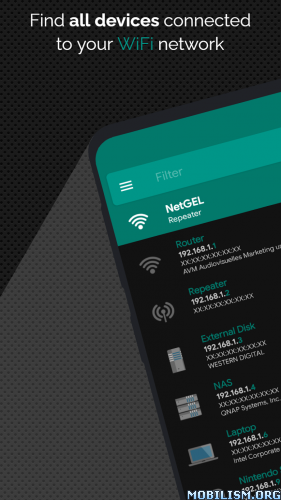

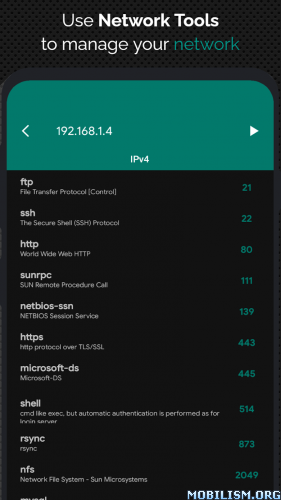

Network scanner: discovers and manages all devices connected at the network.
⭐ Network Scanner
Scan and analyze your network in real time, identifying all connected devices. Get detailed information for each device:
✔️ IP and MAC Address
✔️ NetBIOS, Bonjour, UPnP Name, and Domain
✔️ Manufacturer and Model Name
Advanced Remote Control Tools:
✔️ Wake On LAN (WOL) – Turn on devices remotely via WiFi or mobile data.
✔️ Secure SHell (SSH) – Put a device to sleep or shut it down remotely. View the installed operating system.
⭐ Network Management:
✔️ Load offline all previously detected devices.
✔️ Manually add networks or devices for better control over undetected ones.
⭐ Network Analyzer – Monitor and Diagnose Your Network
✔️ WiFi Information: View external IP, signal strength, download/upload speed, gateway, and DNS.
✔️ Mobile Network Data: Analyze external IP, CID, LAC, MCC, MNC, and connection speed.
✔️ WiFi Scan: Detect nearby networks and display SSID, signal strength, channel, and encryption.
✔️ WiFi Band Graph: Visualize channel overlap to optimize network performance.
✔️ Remote Monitoring: Check CPU usage, RAM usage, and available disk space on connected devices.
✔️ Network Security: Get real-time alerts when a new or unknown device joins your WiFi network.
⚙️ Advanced Network Tools
✔️ Ping Tool – Test connectivity for any device or domain.
✔️ Port Scanner – Scan the most commonly used open ports.
✔️ Traceroute – Track packet routes to the target host, with interactive map view.
✔️ IP Calculator – Generate subnet masks, CIDR, and IP ranges.
✔️ IP Geolocation – Find the geographic location of any IP address.
✔️ MAC Address Lookup – Identify the vendor from a MAC address.
✔️ DNS Lookup & Reverse DNS – Retrieve IP addresses, mail servers, and more.
✔️ Network Position Mapping – Visualize scanned networks on a map.
✔️ Speed Test – Measure your download and upload speeds.
✔️ Tethering Support – Analyze networks even in hotspot mode.
✔️ IPv6 Support – Compatible with Ping, Traceroute, Port Scan, and IP Calculator.
✔️ Backup & Restore – Save and recover data locally.
⭐ Customizable Themes – Personalize the app’s appearance!
Follow me on Twitter @developerNetGEL for updates, support, and new features!
.apks Bundle Installation:
SAI Instructions: [no root]
1. Download and install latest SAI app (Split APK Installer) – https://github.com/Aefyr/SAI/releases
2. Download this .apks archive app;
3. Install and Open SAI / Choose “Install APKs” button / Find and Select downloaded .apks archive app;
4. Wait for install and done. Enjoy!
Lucky Patcher Instructions: [no root]
1. Download and install latest Lucky Patcher app;
2. Install and Open Lucky Patcher and choose ‘Rebuild & Install’;
3. Find and Select downloaded this .apks archive app;
4. Wait for install and done. Enjoy!
PS: Make sure after open SAI or Lucky Patcher you allowed STORAGE Permission and Install Unknown Apps Permission!
★ Untouched Paid apk with Original Hash Signature
★ Certificate MD5 digest: 348cac5ad77e3afa237d6efba4726f96
★ No changes were applied
➡ Languages: en
➡ CPU architectures: arm64-v8a, armeabi-v7a
➡ Screen DPIs: 120dpi, 160dpi, 240dpi, 320dpi, 480dpi, 640dpi
What’s New:
No changelog
This app has no advertisements
More Info:
https://play.google.com/store/apps/details?id=com.tools.netgel.netxpro&hl=enDownload Instructions:
.apks Bundle:
https://upfiles.com/U0CS
Mirror:
https://katfile.com/qr8f481c6stq/NetX_PRO_v11.0.0.0_117.apks.html
Standalone Android Package (No SAI needed):
https://upfiles.com/1XGLlakA
Mirror:
https://katfile.com/5ujgqmxolt0e/NetX_PRO_v11.0.0.0_117.apk.html
You like the post? Follow us on Telegram .
