MT Manager v2.18.1 build 25031086

Requirements: 5.0+
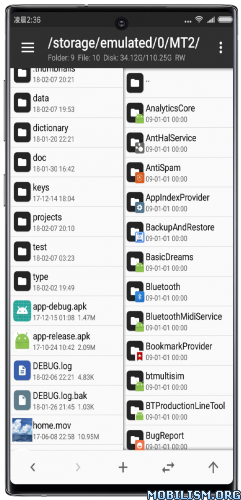
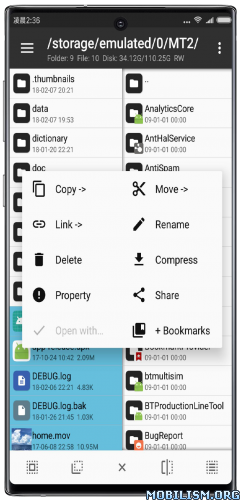
Overview: MT Manager is a very powerful file manager and apk editor, you can use it to do a lot of things on your device, such as managing files, modifying and translating applications, editing text and so on.
Features:
– FTP client
– Viewing the java code
– Support for keystore and jks signatures [VIP]
– Search History
– Search in XML files
– Search by ID in arsc
– Support for several dictionaries in the translator (UTF-8 without BOM) [VIP]
– Removing and adding localizations
– Fast transfer of unique strings to the desired localization
– Batch operations (delete, copy, move, rename)
– APK/ZIP Signing
– Cloning of APKs [VIP, free for the old method]
– Optimizing APK
– APK Encryption
– Creating a backup (.bak)
– Convenient color change in arsc
– Current Activities List
– Remote access via WiFi
– Decompilation / Compiling XML [VIP] (non-vip is limited to only 200-lines)
– Arsc Editor
– DEX Editor
– Fix DEX files [VIP]
– Text editor with syntax highlighting
– Comparison of text files up to 500 KB [VIP]
– View fonts (.ttf)
– Executing scripts
– Working with RAR (opening / unpacking)
– Work with ZIP (compression / unpacking)
– Multi-choice
– View / edit / delete / add classes, methods, domains, permanent
– Baidu Translator, Yandex and Google [VIP]
★ Untouched apk with Original Hash Signature
★ Certificate MD5 digest: 1a32f661095560285c0f7ea0b521cb45
★ No changes were applied
➡ Languages: Full Multi Languages
➡ CPU architectures: arm64-v8a, armeabi-v7a, x86, x86_64
➡ Screen DPIs: 120dpi, 160dpi, 240dpi, 320dpi, 480dpi, 640dpi
Note: The clone can be installed alongside the regular/normal version {Package Name: bin.mt.plus.canary}, useful in case you have multi-login activated, or need two separate instances of the app.
What’s New:
Version: 2.18.1 ✅️ (25031086)
– Added simple video player
– Added custom injection class name, so library name, original package file name, etc for kill signature function
– Added new features for dex+ navigation menu: copy method code, copy as frida/xposed fragment
– Added support external APP to open MT video player
– Added filtering by resource name to Arsc translation mode
– Added function of zeroing selected data in hex editor
– Added support direct preview when opening xml files in vector format
– Text editor search support history records in setting extraction expression input box
– Text comparator supports switching between left/right or top/bottom view modes
– Text comparator supports turning on display of alignment position guides
– Text comparator achieves scroll synchronization in a more precise way
– Text comparator automatically synchronizes cursor positions on both sides
– Optimized memory usage of Dex redivision function
– Optimized Dex anti confusion function and fully retain internal class relationships
– Fixed problem when mt appears in options contacts
– Fixed problem when can’t open text editor in dex editor+ in some case
– Fixed problem in dex+ and arsc+ when delete files
– Fixed problem with opening some arsc files
– Fixed problem with saving files in dex+
– Fixed problem in music player
– Fixed problem when exporting empty file in dex+
– Fixed problem of inconsistent signatures displayed in Edge v1v2
This app has no advertisements
More Info:
https://mt2.cn
https://t.me/mtmanager
Download Instructions:
https://frdl.is/0xmj0z2amu66/MT2.18.1.apk
Mirrors:
https://upfiles.com/hNeI
https://katfile.com/hkmhtytmpyy1/MT2.18.1.apk.html
Clone:
https://frdl.is/yh2sd2pcg2de/MT2.18.1-clone.apk
Mirrors:
https://upfiles.com/RqOU
https://katfile.com/5vcwwkbtkqdc/MT2.18.1-clone.apk.html
You like the post? Follow us on Telegram .
