MT Manager v2.18.0 build 25020759

Follow Us!

Requirements: 5.0+
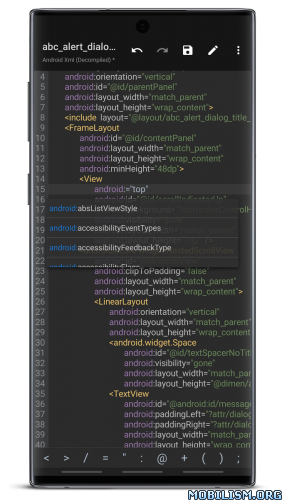
Overview: MT Manager is a very powerful file manager and apk editor, you can use it to do a lot of things on your device, such as managing files, modifying and translating applications, editing text and so on.
Features:
– FTP client
– Viewing the java code
– Support for keystore and jks signatures [VIP]
– Search History
– Search in XML files
– Search by ID in arsc
– Support for several dictionaries in the translator (UTF-8 without BOM) [VIP]
– Removing and adding localizations
– Fast transfer of unique strings to the desired localization
– Batch operations (delete, copy, move, rename)
– APK/ZIP Signing
– Cloning of APKs
– Optimizing APK
– APK Encryption
– Creating a backup (.bak)
– Convenient color change in arsc
– Current Activities List
– Remote access via WiFi
– Decompilation / Compiling XML [VIP] (non-vip is limited to only 200-lines)
– Arsc Editor
– DEX Editor
– Fix DEX files [VIP]
– Text editor with syntax highlighting
– Comparison of text files up to 500 KB [VIP]
– View fonts (.ttf)
– Executing scripts
– Working with RAR (opening / unpacking)
– Work with ZIP (compression / unpacking)
– Multi-choice
– View / edit / delete / add classes, methods, domains, permanent
– Baidu Translator, Yandex and Google [VIP]
What’s New:
v2.18.0
Remake music player, supports list loop and background playback and other functions
Image browser supports displaying WebP animations (requires Android 9.0+)
Optimize the processing logic of the image browser, and make it easier to zoom in and out and slide left and right.
Fixed the problem that the interface would jitter when the image browser switched to full screen mode
Supports custom system installer called when installing APK
Rename is supported when adding a single file (folder) to a ZIP/APK file
Fixed the issue that the Platform properties will be lost after ZIP files are modified
Fixed an issue where APK optimization function compressed files in assets/dexopt
The “Swap Window” function has been added to the menu in the upper right corner of the main interface
New text editor shortcut functions: format code, compressed code
File batch renaming function adds APK file-related and time-related expressions
Algorithm for optimizing file list sorting by name (for file names similar to MD5, it will not be sorted by numerical size)
Fixed the issue where the bottom toolbar was not visible using free window mode on some systems
Package Info:
- Languages: Full Multi Languages;
- CPUs: armeabi-v7a, arm64-v8a, x86, x86_64
- Screen DPIs: 160dpi, 240dpi, 320dpi, 480dpi, 640dpi;
- Untouched apk with Original Hash Signature, no [Mod] or changes was applied;
- Certificate MD5 digest: 1a32f661095560285c0f7ea0b521cb45
This app has no advertisements
More Info:
https://mt2.cn
https://t.me/mtmanager
Download Instructions:
https://frdl.io/v7r2kzjqvsd0
Mirrors:
https://modsfire.com/NK6rFrfduO6oed2
https://upfiles.com/v5seKAM0
https://mega4upload.net/q552uzixzvxn
https://katfile.com/oonohnfkinq8
https://filespayouts.com/o72gaqed1qdj/M … x86_64.apk
https://dailyuploads.net/nplzcx8kaq97
Clone:
https://frdl.io/3effvwl89d8g
Mirrors:
https://modsfire.com/R9QEjdXW86aR6F8
https://upfiles.com/8KI5s
https://mega4upload.net/p5bmkxvlsn8q
https://katfile.com/e7pi1y7gn10o
https://filespayouts.com/sjouruno35u3/M … x86_64.apk
https://dailyuploads.net/bk74b95drvrt
You like the post? Follow us on Telegram .