IPTV Pro v9.0.9 [Paid] [Patched] [Mod Extra]
![IPTV Pro v9.0.9 [Paid] [Patched] [Mod Extra]](data:image/svg+xml,%3Csvg%20xmlns='http://www.w3.org/2000/svg'%20viewBox='0%200%20282%20500'%3E%3C/svg%3E "IPTV Pro v9.0.9 [Paid] [Patched] [Mod Extra]")
Requirements: 5.0+
Overview: Watch IPTV from your Internet service provider or free live TV channels from any other source in the web.
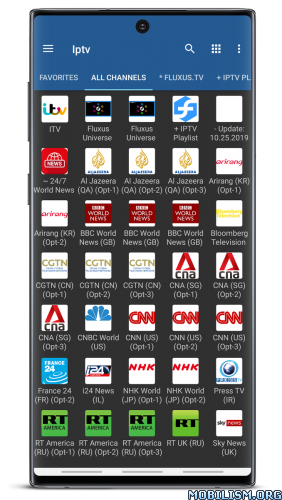
This is the paid version of IPTV app.
Pro features (comparing with free version):
✔ Ad free
✔ Ability to auto-reconnect to streaming server when connection is closed unexpectedly (http streams only).
✔ Start app on device boot option, useful for set-top boxes.
✔ Auto-play last channel option
✔ Extended playlists history
If you are using VLC to watch TV on your PC then this app is for you.
Features:
✔ M3U and XSPF playlists support
✔ Playlists history
✔ Playing multicast streams with UDP proxy (proxy need to be installed in your LAN)
✔ Ability to auto-reconnect to streaming server when connection is closed unexpectedly (http streams only)
✔ Grid or list view of TV channels
✔ EPG support in XMLTV and JTV formats
✔ Start app on device boot option
Please note that this app doesn’t contain any built-in channels. You need to have playlist with TV channels in order to use this app.
For multicast streams it’s recommended to use UDP proxy:
* for Windows: download and install UDP-to-HTTP proxy from http://borpas.info/download/UdpProxy.exe or check the corresponding option while installing IP-TV Player http://borpas.info/iptvplayer
* for Linux: install udpxy (http://udpxy.com/index-en.html, http://sourceforge.net/projects/udpxy/)
* the best solution would be installing udpxy on your WLAN router, this can be done for DD-WRT (http://www.dd-wrt.com) and OpenWrt (https://openwrt.org) firmware
* some WLAN routers have built-in udpxy in manufacturer’s firmware
Please join translations project at https://crowdin.com/project/iptv/invite if you want to add new or improve existing translation.
What’s New:
Bug fix
Mod Info:
- No root or Lucky Patcher or Google Play Modded required;
- Disabled / Removed unwanted Permissions + Receivers + Providers + Services;
- Optimized and zipaligned graphics and cleaned resources for fast load;
- Ads links removed and invokes methods nullified;
- Ads layouts visibility disabled;
- Google Play Store install package check disabled;
- Debug code removed;
- Remove default .source tags name of the corresponding java files;
- Assets folder removed completely;
- Analytics / Crashlytics / Firebase disabled;
- AOSP compatible;
- Languages: Full Multi Languages;
- CPUs: armeabi-v7a, arm64-v8a, x86, x86_64;
- Screen DPIs: 120dpi, 160dpi, 240dpi, 320dpi, 480dpi, 640dpi;
- Original package signature changed;
- Release by Balatan.
This app has no advertisements
More Info:
https://play.google.com/store/apps/details?id=ru.iptvremote.android.iptv.proDownload Instructions:
armeabi-v7a:
https://modsfire.com/LWM3i8ho40pBN00
Mirrors:
https://upfiles.com/Lu0j
https://mega4upload.net/mbrq2z09tu5d
https://katfile.com/0e0grgyvsgny
https://filespayouts.com/qi4pqexf49va/I … bi-v7a.apk
https://dailyuploads.net/28zqcz0jd34s
x86:
https://modsfire.com/8d784Thwq6vbt4B
Mirrors:
https://upfiles.com/941L
https://mega4upload.net/f1xkovxn921l
https://katfile.com/d2ybn4z4i4ck
https://filespayouts.com/6aatfdzza6iz/IPTV_Pro-v9.0.9_build_2167-Mod-x86.apk
https://dailyuploads.net/arifb48btswx
arm64-v8a:
https://modsfire.com/8b11fdNffOvDpTZ
Mirrors:
https://upfiles.com/CEignw
https://mega4upload.net/udvvwhbmkb5c
https://katfile.com/blyl55iyvkuc
https://filespayouts.com/mhftmpb49pf8/I … 64-v8a.apk
https://dailyuploads.net/sqfvgoblizf2
x86_x64:
https://modsfire.com/Vy5BK7VLxN30tGs
Mirrors:
https://upfiles.com/LF0uoW
https://mega4upload.net/2ampdmjo5h73
https://katfile.com/ixpy933l9xjw
https://filespayouts.com/g73uvs1orery/IPTV_Pro-v9.0.9_build-4167-Mod-x86_x64.apk
https://dailyuploads.net/r7gvcipf3uxr
You like the post? Follow us on Telegram .
