Image Converter Pro v4.5.5 [Paid] [Bundle] + [AntiSplit]
![Image Converter Pro v4.5.5 [Paid] [Bundle] + [AntiSplit]](data:image/svg+xml,%3Csvg%20xmlns='http://www.w3.org/2000/svg'%20viewBox='0%200%20250%20500'%3E%3C/svg%3E "Image Converter Pro v4.5.5 [Paid] [Bundle] + [AntiSplit]")
Requirements: 5.0+
Overview: Easy to convert any images to desire image format {NO ADS}. No Internet connection needed. Convert image without loosing its quality and resolution. Convert multiple images/photos to desire format with powerful compression.
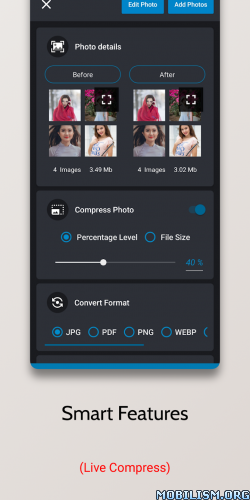
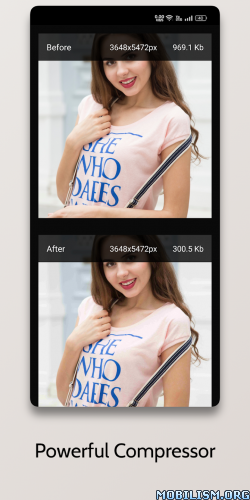
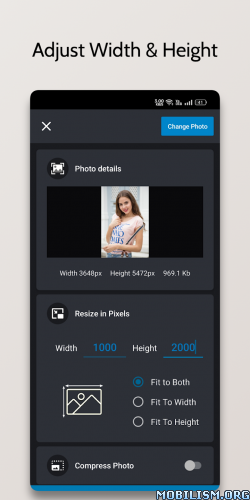
Easy to convert any images to desire image format {NO ADS}.
Image Converter pro is an image/photo converter that allows you to transform photos or images to other extensions
Image Converter Pro Features :-
– No Ads
– No Internet connection needed
– Save converted image directly to gallery.
– Easy to choose image output format type
– Edit output image file name
– Convert image without loosing its quality
and resolution
– You can share directly from the view
images in converted images and from
converted gallery as well.
– Manage all converted images directly
from gallery, you can later share or delete
converted images.
– {New} Batch converter feature – convert multiple images/photos to desire format with powerful compression which also help to compress photos size
.apks Bundle Installation:
SAI Instructions: [no root]
1. Download and install latest SAI app (Split APK Installer) – https://github.com/Aefyr/SAI/releases
2. Download this .apks archive app;
3. Install and Open SAI / Choose “Install APKs” button / Find and Select downloaded .apks archive app;
4. Wait for install and done. Enjoy!
Lucky Patcher Instructions: [no root]
1. Download and install latest Lucky Patcher app;
2. Install and Open Lucky Patcher and choose ‘Rebuild & Install’;
3. Find and Select downloaded this .apks archive app;
4. Wait for install and done. Enjoy!
PS: Make sure after open SAI or Lucky Patcher you allowed STORAGE Permission and Install Unknown Apps Permission!
★ Untouched Paid apk with Original Hash Signature
★ Certificate MD5 digest: 2207a8795ab967ec957c533ade9726fe
★ No changes were applied
➡ Languages: en
➡ CPU architectures: Universal
➡ Screen DPIs: 120dpi, 160dpi, 240dpi, 320dpi, 480dpi, 640dpi
What’s New:
Image converter Premium – {No Ads} New UI
Images to JPG, PNG, PDF, JPEG, GIF, BMP, WEBP Converter
New Features And improvement
– Manage export path directly from app
– Percentage Resizer Added
– Preserve Aspect ratio
– Specific Compressor
– Gallery picker added
– Crop aspect ratio added
– Realtime photo size and resolution
– Crop feature added
– Fix bugs
This app has no advertisements
More Info:
https://play.google.com/store/apps/details?id=com.csdeveloper.imgconverterpro&hl=enDownload Instructions:
.apks Bundle + AntiSplit:
https://upfiles.com/i1ipN
Mirror:
https://katfile.com/9hb11tcrm5lp
You like the post? Follow us on Telegram .
