EXIF Image & Video Date Fixer v2.17.1 b2170011 [Premium]
![EXIF Image & Video Date Fixer v2.17.1 b2170011 [Premium]](data:image/svg+xml,%3Csvg%20xmlns='http://www.w3.org/2000/svg'%20viewBox='0%200%20230%20500'%3E%3C/svg%3E "EXIF Image & Video Date Fixer v2.17.1 b2170011 [Premium]")
Follow Us!

Requirements: 9 and up
Overview: Fix your messed up gallery after moving files from another phone or storage.
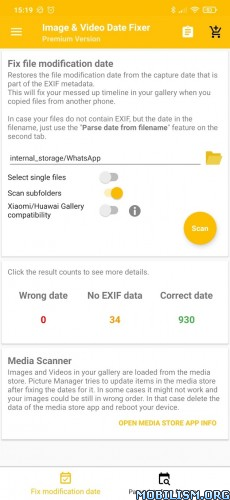
Ever copied images from one phone to another, or from an external storage to your phone and ended up with a messed gallery?
This happens because the file modification dates of your images have now the date the images were copied at.
Here comes Image and Video Date Fixer to the rescue. It can read the creation date of images and files from its metadata and set that as file modification date.
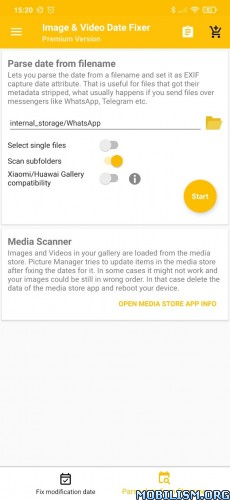
In case your images do not contain EXIF Metadata, but contains the date in the filename itself, Image and Video Date Fixer can even parse filenames to extract the date and set it as EXIF date attribute.
The free version allows to process 100 files per batch.
If you want to process more files per batch you can buy the premium version via an in app purchase.
Attention:
Due a bug in the Android Framework, fixing the file modification date will just work on Android 9 upwards. In some cases it might also work on Android 8 for some manufacturers.
What’s New:
2.17.1
• Fixed app crashing on start
2.17.0
• Added “Refresh media store” action to sidebar
• Added support for Sony’s .ARQ Pixel Shift files
• Fixed excluding items from WhatsApp Preview dialog not working
• Moved general settings to sidebar
2.16.0
• Removed Google Play Installation protection to allow installation outside of playstore
• Remember directory when selecting storage path.
This app has no advertisements
More Info:
https://play.google.com/store/apps/details?id=eu.duong.imagedatefixer&hl=enDownload Instructions:
https://devuploads.com/4y8hl5lm2m95
Mirror:
https://uploadrar.com/4juzcz9ua7kj
You like the post? Follow us on Telegram .